Conditions
Conditions are powerful components that add decision-making capabilities to your workflows. They allow your automations to follow different paths based on specific criteria, making your workflows more intelligent and adaptable to various scenarios.
Understanding Conditions
A condition is a decision point in your workflow that:
- Evaluates an expression that resolves to true or false
- Directs the workflow along different paths based on the result
- Allows for dynamic behavior based on data and context
- Creates branching logic for complex decision trees
Types of Conditions
Wakflo offers several types of conditions to handle different decision-making needs:
Boolean (If/Else Condition)
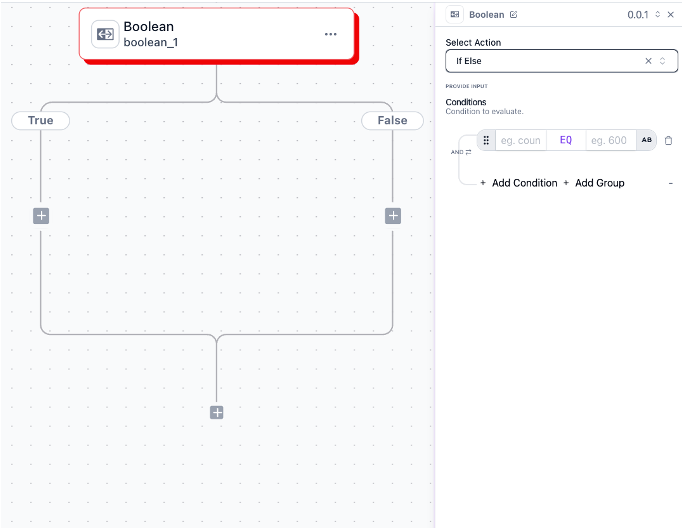
The most common condition type that evaluates a single expression:
- If Branch: Executes when the condition evaluates to true
- Else Branch: Executes when the condition evaluates to false
- Merge Point: Where branches rejoin
Use for simple binary decisions like “if order value > $100, send VIP shipping notification, else send standard notification.”
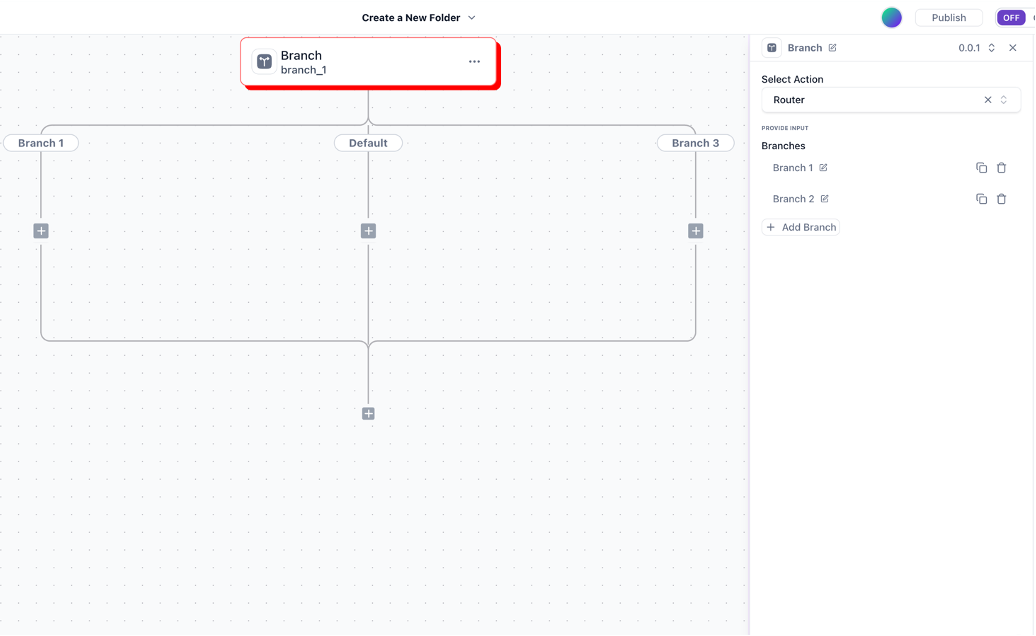
Branch (Multi-Conditions)
Evaluates multiple expressions in sequence:
- Multiple Conditions: Series of expressions to evaluate
- Multiple Branches: One for each condition plus a default
- Order Matters: Conditions are evaluated in sequence
Perfect for complex decisions with multiple criteria like “evaluate customer based on purchase history, account age, and VIP status.”
Creating Conditions
Add condition component
Click the ”+” button where you want to add a condition
Select condition type
Choose from Boolean or Branch
Define the condition expression
Create the logical expression to evaluate
Configure branches
Add actions to each branch of the condition
Set up merge point (optional)
Configure where branches should rejoin
Building Condition Expressions
Condition expressions are logical statements that evaluate to true or false. Wakflo provides a powerful expression builder to create these statements.
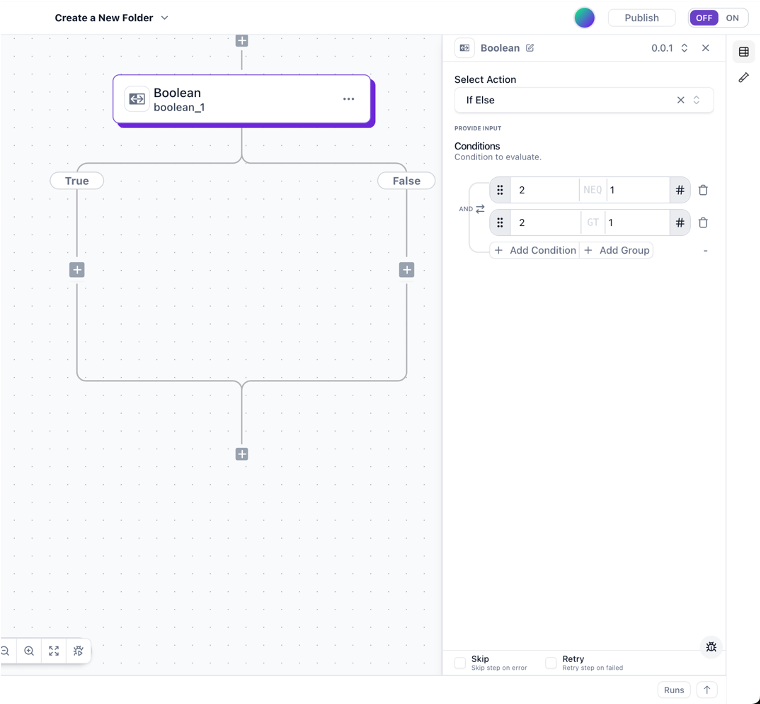
The expression builder includes:
- Data Browser: Access data from previous steps
- Operators: Comparison and logical operators
Comparison Operators
| Operator | Symbol | Description | Example |
|---|---|---|---|
| Equals | = | Checks if values are equal | order.status = “shipped” |
| Not Equals | != | Checks if values are not equal | order.status != “cancelled” |
| Greater Than | > | Checks if left value is greater | order.total > 100 |
| Less Than | < | Checks if left value is less | inventory.quantity < 10 |
| Greater Than or Equal | >= | Checks if left value is greater or equal | customer.orders >= 5 |
| Less Than or Equal | <= | Checks if left value is less or equal | product.stock <= reorder_level |
| Contains | contains | Checks if string/array contains value | product.tags contains “sale” |
| Starts With | startsWith | Checks if string starts with value | customer.email startsWith “vip” |
| Ends With | endsWith | Checks if string ends with value | file.name endsWith “.pdf” |
Logical Operators
| Operator | Symbol | Description | Example |
|---|---|---|---|
| And | AND | True if both conditions are true | order.total > 100 AND customer.vip = true |
| Or | OR | True if either condition is true | inventory < 5 OR restock_ordered = true |
Condition Examples
Order Processing Examples
High-Value Order Handling
order.total > 500Use to route high-value orders for special handling, insurance, or verification.
International Shipping Routing
NOT (order.shipping_address.country = “US” OR order.shipping_address.country = “CA”)Identifies international orders that need customs documentation.
Special Product Handling
anyOf(order.items, item => item.requires_assembly = true)Detects orders containing products that require assembly instructions.
Payment Status Check
order.payment_status = “paid” AND order.fulfillment_status = “unfulfilled”Identifies paid orders ready for fulfillment.
Inventory Management Examples
Low Stock Alert
product.inventory_quantity <= product.reorder_threshold AND NOT product.reorder_placedTriggers reordering process when stock falls below threshold.
Out of Stock Handling
product.inventory_quantity = 0 AND product.backorder_allowed = falseUpdates product availability status when completely out of stock.
Seasonal Inventory Check
product.tags contains “seasonal” AND dateDiff(product.season_end_date, now(), “days”) < 30Identifies seasonal products approaching end of season for promotion.
Warehouse Routing
order.shipping_address.zip startsWith “9” AND order.total_weight < 20Routes west coast lightweight orders to specific fulfillment center.
Customer Management Examples
VIP Customer Detection
customer.lifetime_value > 1000 OR customer.orders_count > 10Identifies high-value customers for special treatment.
Re-engagement Campaign
dateDiff(now(), customer.last_order_date, “days”) > 90 AND customer.marketing_consent = trueTargets inactive customers for re-engagement marketing.
Support Ticket Prioritization
(ticket.customer.plan_tier = “enterprise” OR customer.lifetime_value > 5000) AND ticket.status = “new”Prioritizes support tickets from enterprise or high-value customers.
Birthday Promotion
formatDate(customer.birthday, “MM-DD”) = formatDate(now(), “MM-DD”) AND customer.marketing_consent = trueSends special offers to customers on their birthday.
Complex Condition Patterns
Nested Conditions

You can create complex decision trees by placing conditions inside other condition branches:
- First-level condition evaluates a primary criterion
- Second-level conditions perform further evaluation
- Each branch can contain its own conditions
- Creates a decision tree with multiple outcomes
Example use case: Order routing based on country, then by order value, then by product type.
Parallel Conditions
Multiple independent conditions that evaluate different aspects:
- Each condition operates independently
- Different aspects of a workflow can branch separately
- Results don’t depend on each other
- Useful for handling multiple decision points
Example use case: Simultaneously checking inventory status, payment verification, and fraud detection for an order.

Loop with Conditions

Combining loops and conditions for iterative decision making:
- Loop through a collection of items
- Apply conditions to each item
- Take different actions based on item properties
- Aggregate results across all iterations
Example use case: Processing order items differently based on product category, shipping requirements, or inventory status.
Best Practices for Conditions
Keep Conditions Simple
Break complex conditions into multiple simpler conditions for better readability and maintenance.
Use Descriptive Names
Give your conditions clear names that describe their purpose (e.g., “Check High-Value Order”).
Handle All Cases
Ensure your conditions account for all possible scenarios, including edge cases and unexpected values.
Data Type Awareness
Be mindful of data types in your conditions (e.g., comparing numbers with numbers, strings with strings).
Test Thoroughly
Test your conditions with a variety of data to ensure they behave as expected in all scenarios.
Consider Default Paths
Always include default or “else” paths to handle unexpected scenarios gracefully.
Document Complex Logic
Add comments to explain the purpose and reasoning behind complex condition logic.
Validate Input Data
Check that required data exists before using it in conditions (e.g., using isEmpty() function).
Debugging Conditions
When conditions don’t behave as expected, use these debugging techniques:
Enable condition logging
Turn on detailed logging for conditions in workflow settings
Use test mode
Run the workflow in test mode with sample data to see condition evaluation
Check condition visualization
View the visual indicators showing which path was taken
Inspect data values
Compare the actual data values against your condition criteria
Simplify for testing
Temporarily simplify complex conditions to isolate issues
Use the “Condition Debugger” tool in the workflow editor to step through condition evaluation and see exactly how your expressions are evaluated with your data.
Common Condition Issues
Type Mismatches
Problem: Comparing values of different types (e.g., comparing a string “100” with number 100)
Solutions:
- Use type conversion functions: toNumber(), toString()
- Check data types before comparison with isNumber(), isString()
- Be aware of data formats from different integrations
- Preview actual data values in the data panel when building conditions
Missing Data
Problem: Condition fails because expected data is null or undefined
Solutions:
- Use isEmpty() to check if data exists before using it
- Provide default values: value || defaultValue
- Add nested conditions to handle different data scenarios
- Implement data validation steps before conditions
Logic Errors
Problem: Condition logic doesn’t match intended business rules
Solutions:
- Review operator precedence (AND, OR, NOT)
- Use parentheses to clarify complex expressions
- Break complex conditions into multiple simpler ones
- Test with edge cases to verify correct behavior
Case Sensitivity
Problem: String comparisons fail due to case differences
Solutions:
- Convert both sides to the same case: toLowerCase(), toUpperCase()
- Use case-insensitive comparison functions
- Normalize strings before comparison
- Document case sensitivity requirements for your workflows
Advanced Condition Techniques
Calculated Conditions

Use formulas and functions to create dynamic condition criteria:
- Calculate threshold values dynamically
- Compare against historical averages
- Implement time-based conditions
- Create scoring systems for complex evaluations
Example: order.total > (customer.average_order_value * 1.5)
Integrating Conditions with Other Components
Conditions + Loops
Use conditions inside loops to filter or process items differently based on their properties.
Conditions + Data Mapping
Use condition results to determine what data is mapped to subsequent steps.
Conditions + Error Handling
Implement conditional error handling based on error types or other context.
Next Steps
Now that you understand conditions, explore related topics: